


Posted: July 14th, 2025
How To Improve Your Restaurant Website & Make Your Customers Happy
I’ve looked at a lot of restaurant websites over the years and have identified some consistently bad practices that appear over and over again. Each one of these could be deal breaker blows that push someone who was interested, to go elsewhere.
Before I really get into the main list, I have to address this one: if you don’t actually have a website and you’re just relying on 3rd party services such as Facebook or Yelp as your “internet presence”, you’re doing yourself and your potential customers a disservice. Why? Because your own website is a spot on the internet that you have complete control over. You’re not at the mercy of a 3rd party or a social platform that may change what it does at any moment. And I actually have talked to restaurant owners that feel that having a Facebook page = having a “website”. It does not. With DIY options and even AI assistance (full disclosure, I feel AI built websites are pretty cringe, but it still may be a step up from having no website at all as you should still be able to put your own information in there). I could say, just hire a professional to create your site, but I’ve even seen sites where the restaurant owner paid someone else to do it and there were still glaring problems.
So now let’s dive in and I’ll point out the top offenders and give you some tips on what to do instead to vastly improve your chances to get someone in the door.
Location, Location, Location
This is the top of the list because I’ve seen sites (especially DIY and “template” sites) actually put all their location info behind a Contact page. Now don’t get me wrong, your location info absolutely should be on your contact page, but don’t force people who are mobile, on their phones and looking for a place to eat to have to click anything. Put your address right in the top header. Don’t make people hunt for this info. I’d also recommend making the address clickable to Google maps.
Don’t forget hours and phone number too …
When you’re open is just as important as where you’re located. So put that in the top header of your site as well. Phone numbers are great too if you do to-go orders. If you’re hooked up with any 3rd party delivery services (Doordash, Grub Hub, etc.), you can put those logos right in the top header of your site and link to your page on those services. If you take reservations, be sure to note that with text such as : RESERVATIONS: (your phone number).
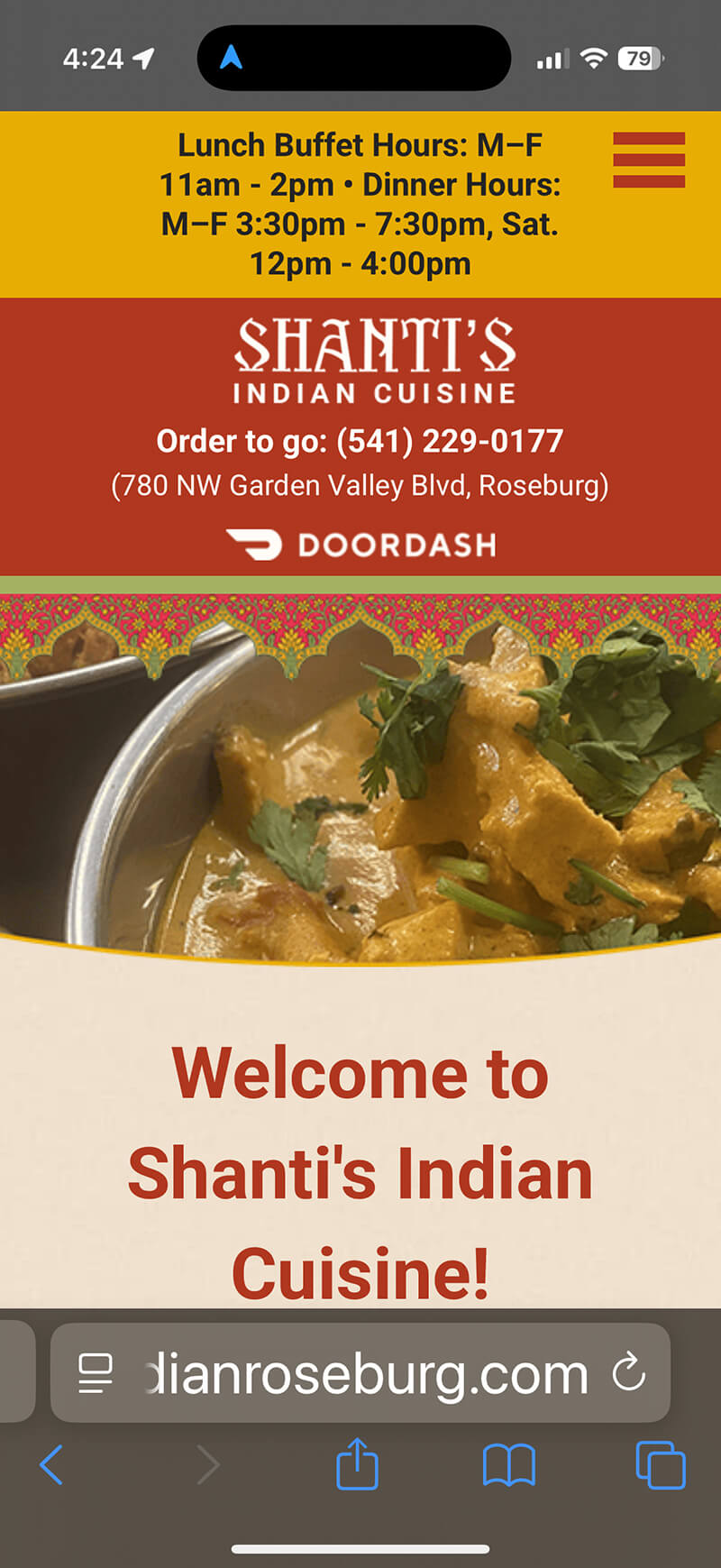
Here’s an example of a basic, informational restaurant website that we created as viewed on a mobile phone. Note the hours, phone, address and the Doordash logo all appear right at the top of the screen. Easy!
Menus
This one is definitely the 2nd most looked at thing on a restaurant site and I’ve seen two popular ways to screw this up.
Linking to a social media page for your menu…
I’ve seen someone go to the trouble of having a site and then either link to, or try to embed their Facebook into their site for their menu. No one wants that, trust me. If you don’t happen to have a Facebook account, this is what someone would see when they go to your page there:
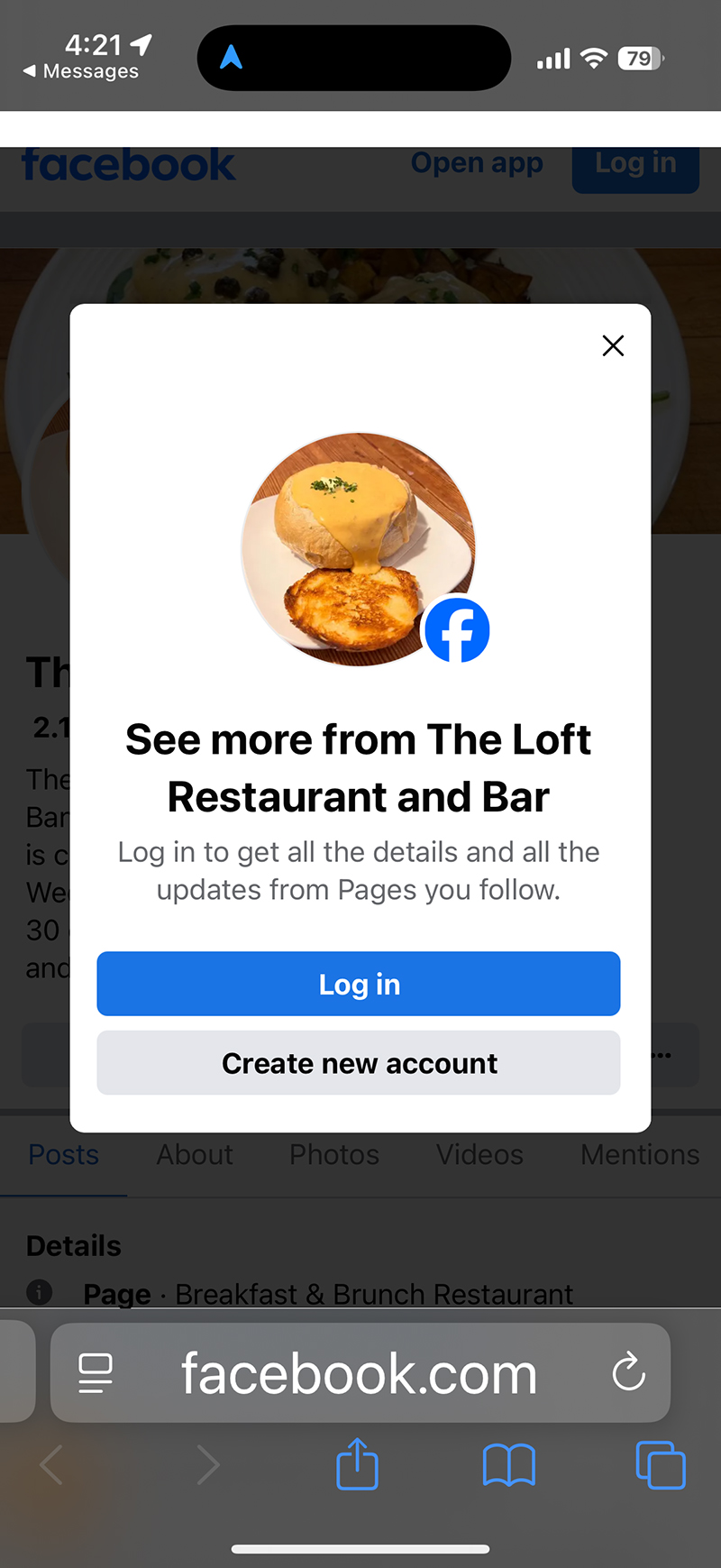
Sometimes, I can click past this screen and possibly see something, but I wouldn’t expect everyone to try to do that. Most people are going to see this pop up and say forget it. It’s best to have your menu right on your website. If you frequently change your menu or have specials, you can note that right on the home page of your website OR you could pull in a feed (I’d go with instagram because it’s easier) and embed that on your site.
Putting your menu up on your site … but it’s a PDF file or one large image …
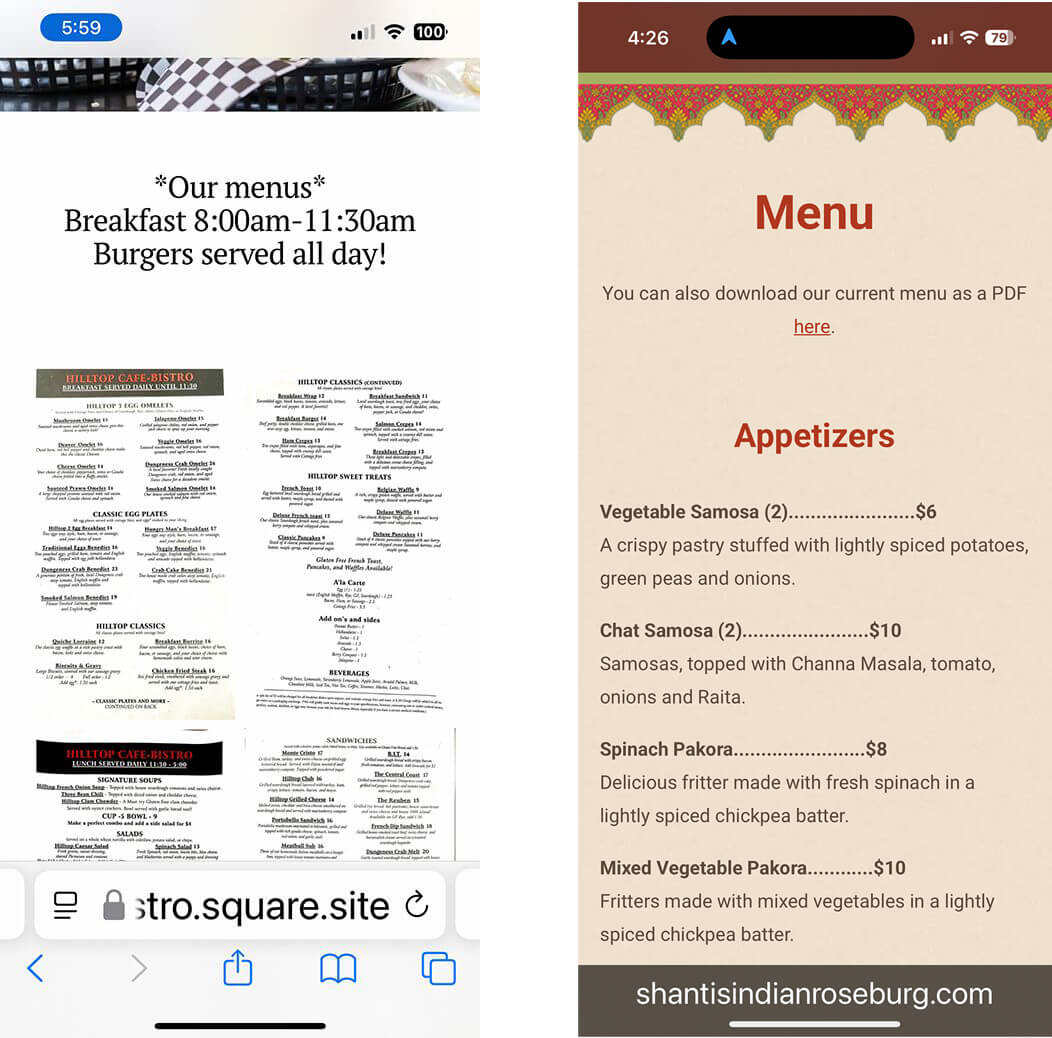
This is the other thing that drives me nuts on a restaurant website. The owner has put the menu up on the site (yay), BUT they’ve uploaded a PDF file … forcing the viewer to go old school “pinch and zoom” on their mobile screens to see what’s on the menu. I’ve also seen menus uploaded to restaurant websites as just one big jpg image. Same thing with the pinch and zoom.
Let me give you a visual example here … the one on the left is a restaurant site that’s uploaded a scanned image as their menu. The one on the right is the Indian restaurant’s website we did where we actually typed out the menu into the page (note: in special circumstances – for example, an office that wants to print out the menu and save it, it’s fine to put a link to a downloadable PDF file, but by all means, type the actual menu into the page so it’s easy to read and scroll through).
Photos
There’s no excuse these days with the average mobile phone having like a 50 megapixel + rating and a zillion settings for lighting and effects to have bad photos on your restaurant’s website, but it still happens all the time.
There are two types of photos to have on your site: the location itself and the food. For location, it’s great to take a shot of the front of the building (so people will know it when they see it). Then, taking photos of the inside of the location is my next recommendation. People absolutely judge a book by its cover so it should go without saying that the place should look its very best. Taking photos before opening, when everything is perfect and squeaky clean is my recommendation. Taking photos with patrons in the location can also be great, but if there are recognizable faces in the photos, you’ll want to get a model release signed (even if it’s just friends and family). There are plenty of free model release forms online, such as this one.
When it comes to the food, lighting is your friend. If you have an outdoor location, taking photos of the food in the morning or later in the day is a great option to get natural light. And by all means, just make sure the photos look appetizing, the food is plated up nicely, and nothing is amiss. If you’re taking snapshots yourself, just pass the photos along to multiple people you know first to get additional pairs of eyes on them.
Additional Information
There is almost always other key bits of information to have your restaurant website that could help potential (and existing) customers out. Here’s just a short list …
- Do you serve alcohol / have a bar? Make sure to list this on your menu and any logistics (such as the bar is in a different area of the restaurant where minors are not allowed).
- Do you have events? Things like live music or if you rent the restaurant out for private events is definitely something you can list on your site.
- Do you do catering or accept special orders? A local bakery near me will do orders for bread and carrot cake, but I’ve also see restaurants who also do catering and have that information on their site.
- Do you have multiple locations? Of course this info should go at the top of your site or on the contact page. I’ve also see some restaurants who have an additional food truck that they take out to events.
- Are you a food truck? This is a special scenario because with your restaurant essentially mobile, you may be at a certain location or you may move around. Be sure to put that info on your site.
- Do you serve any speciality food that caters to certain diets? Think gluten free, vegetarian or vegan, sugar-free, etc.
- What’s your “origin story?” I love a good backstory on just about any site! Be honest and tell people who you are, how you got into the restaurant businesses and what gave you the inspiration to start your restaurant.
I know it’s not easy running a restaurant. It’s a real labor of love, but one that can really pay off. Use these tips to help create the best impression of your restaurant and the food you serve and make your customers happy!